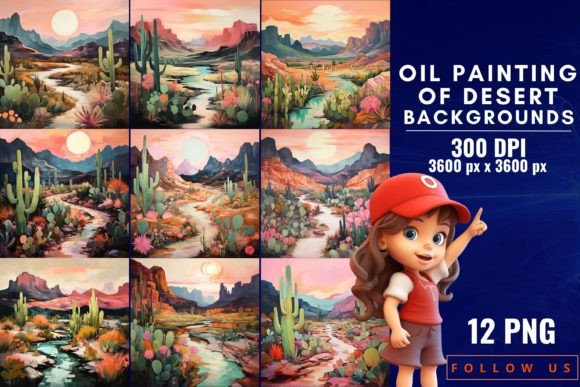
Oil Painting of Desert Backgrounds: Elevate Your Visual Storytelling
Capturing the Essence of the Arid Landscape
There is a specific kind of magic found in the desert that is difficult to replicate with standard photography or flat vector graphics. It is the interplay of light on sand, the rugged texture of rock formations, and the vast, open sky that seems to stretch on forever. When you translate this scenery into oil painting aesthetics, you add a layer of warmth, depth, and artistic sophistication that digital designs often lack. The Oil Painting of Desert Backgrounds collection is designed to bridge the gap between nature’s raw beauty and the digital canvas. It is not just about placing a cactus in a frame; it is about capturing the "Desert Oasis Symphony"—the warmth of the sun, the coolness of the shadows, and the timeless serenity of the dunes.
For designers and creatives, the challenge is often finding design assets that feel authentic. Generic stock photos can make a project feel sterile, whereas these backgrounds offer a tactile, hand-painted quality. You can almost see the bristle marks in the paint and feel the heat radiating from the canvas. This texture is crucial for creating visual hierarchy in your work. Instead of a flat background competing with your foreground text, a textured oil painting backdrop provides depth, allowing your typography and main elements to pop while maintaining a cohesive, artistic environment.
Strategic Applications for Modern Creators
Understanding where and how to use such a distinct premium font of visual assets is key to maximizing their value. These backgrounds are versatile enough to serve various industries, but they truly shine when used with intention.
- Web Design and Landing Pages: If you are building a site for a travel agency, a wellness retreat, or a bohemian fashion brand, these backgrounds can set the tone immediately. They create an immersive experience that standard solid colors cannot match. Use them for hero sections to grab attention instantly.
- Social Media Graphics: In the fast-scrolling world of Instagram or Pinterest, a unique texture stops the thumb. These desert landscapes are perfect for quote graphics, story backgrounds, or promotional posts for outdoor gear. The warm color palette (ochres, terracottas, and sunset oranges) is psychologically engaging and tends to perform well in lifestyle marketing.
- Packaging and Editorial Design: For physical products, particularly in the skincare, candle, or artisanal food industries, the "desert chic" aesthetic conveys natural ingredients and craftsmanship. In editorial design, these backgrounds can set the mood for travel magazines or lifestyle spreads without overpowering the article text.
Integrating Typography with Textured Backgrounds
One of the most common pitfalls in graphic design is choosing the wrong typeface to overlay on a rich, textured background. Because the Oil Painting of Desert Backgrounds are visually complex, your font choices need to be strategic to maintain readability.
Avoid overly ornate script fonts or intricate handwritten fonts for body copy, as they can get lost in the brushstrokes. Instead, consider pairing these backgrounds with clean sans serif fonts for a modern contrast. The simplicity of a geometric sans serif against the organic chaos of an oil painting creates a striking balance. Alternatively, a bold serif font with high contrast can work beautifully for headers, provided you use a drop shadow or a subtle color overlay to separate the text from the image.
Think about the brand identity you are trying to build. If your brand voice is earthy, authentic, and grounded, these backgrounds reinforce that message. However, you must ensure your typography doesn't fight the background for attention. Use the "squint test"—squint your eyes at your design. If the text blurs into the background, you need to increase the contrast or simplify your font pairing.
Maximizing the Value of Your Assets
When working with high-resolution assets like these, file management and usage rights matter. These 12 backgrounds are designed to be high-resolution, meaning they are suitable for both digital screens and print media. You don't want to stretch a low-quality image for a large banner; the pixelation destroys the illusion of the oil paint texture. These files are built to retain that intricate detail, ensuring your logo design or poster looks professional at any size.
For small business owners and marketers, efficiency is vital. Having a bank of 12 distinct variations allows you to maintain visual consistency across a campaign without repeating the exact same image. You might use a sunrise desert scene for morning announcements and a twilight dune setting for evening promotions. This variety keeps your content fresh while staying within a defined aesthetic range.
Practical Tips for Customization
- Color Grading: While the natural desert palette is beautiful, don't be afraid to adjust the hue and saturation in Photoshop to match your specific brand colors. A slight shift towards blue can make it feel cooler and more corporate; a shift towards yellow enhances the vintage feel.
- Opacity and Blending: Try setting the background layer to a lower opacity or using blend modes like "Multiply" or "Overlay" if you are layering it over a solid brand color. This integrates the texture into your brand identity rather than just slapping an image on top.
- Focal Points: Use the composition of the painting to guide the viewer's eye. If the painting has a strong light source in the top left, place your key text or call to action in that area to leverage the natural lighting of the asset.
Ultimately, the goal of using Oil Painting of Desert Backgrounds